
Chunkification#
Overview#
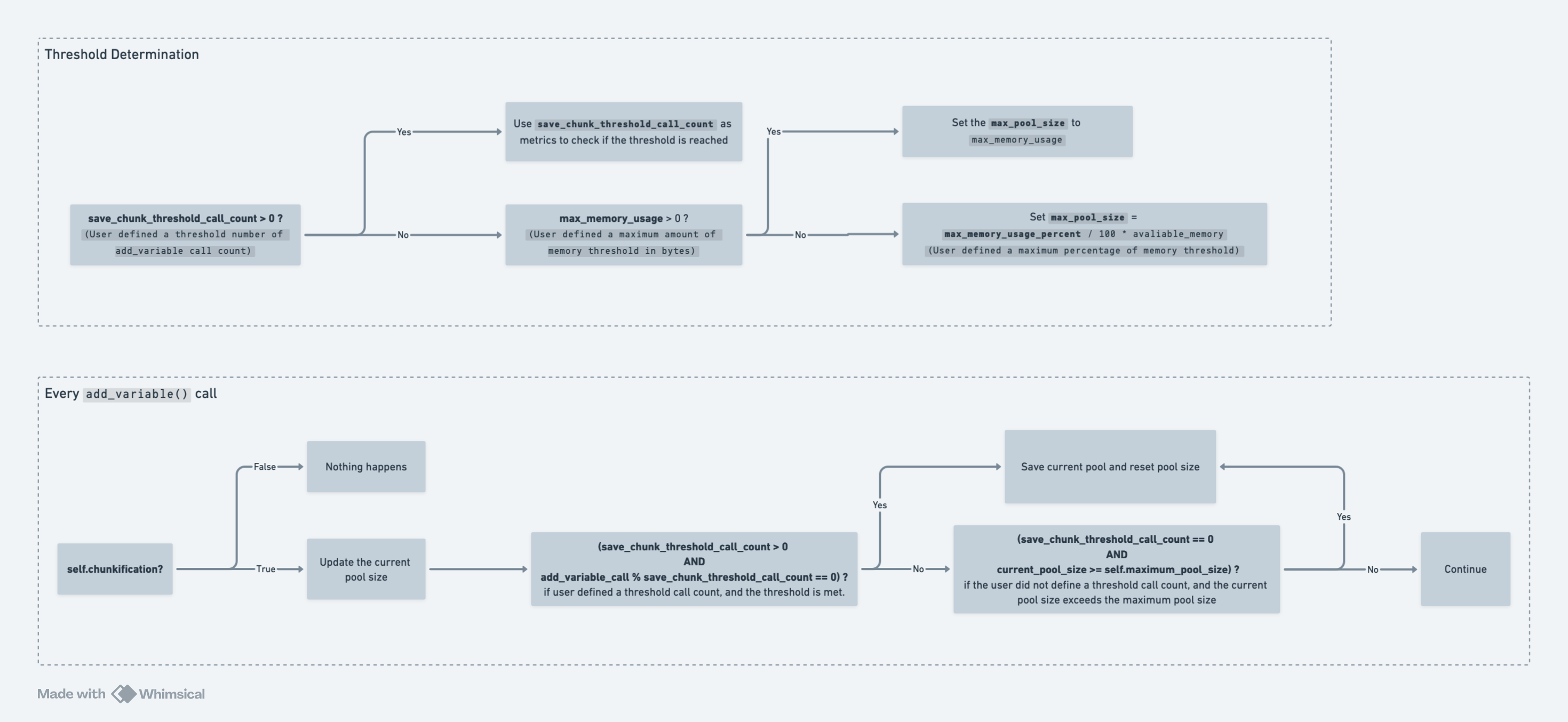
Using chunkification, users can periodically dump the current variable pool and save a chunk into a JSON file. This will allow us to break down a larger simulation pool into smaller chunks to help prevent memory overload. When the simulation is finished, OutputManager (OM) will rebuild the pool, maintaining the order the original data was added, and will continue with postprocessing as it would for a simulation not using chunkification.
Options#
Users can set the chunkification flag to True in the tasks input
JSON file to enable the functionality. Then users can specify one of the
following in the tasks input JSON file for each task:
“save_chunk_threshold_call_count”:
{
  "type": "number",
  "description": "The threshold adds variable call count for saving the output variable pool chunk.",
  "default": 0
}
If this variable is specified, the OM will keep track of the number of calls to the
OM.add_variable()function. Once it reaches the threshold number, the current variable pool will be dumped, and the other metrics will be ignored.“maximum_memory_usage”:
{
  "type": "number",
  "description": "The maximum memory usage in Bytes.",
  "default": 0
}
If
save_chunk_threshold_call_countis not specified but this variable is, the OM will setOM.max_pool_sizeto the specifiedmaximum_memory_usageamount. The OM will estimate the current pool size every time theOM.add_variable()function is called and check against the max pool size. If the threshold is reached, the current variable pool will be dumped.The OM will accumulate the average size addition per add_variable call to estimate the current pool size.
If multiple workers are defined, the
TaskManagerwill treat each task equally and evenly distribute the max_memory_usage to all tasks. This means if the max_memory_usage is 8 * (1024 **3) Bytes and there are 8 workers; each worker will get 1 * (1024 **3) Bytes of max memory“maximum_memory_usage_percent”:
{
  "type": "number",
  "description": "The maximum percentage of memory use.",
  "default": 80
}
If neither
save_chunk_threshold_call_countnormaximum_memory_usageis specified, we will usemaximum_memory_usage_percentto determine the maximum memory usage by simply multiplying it with the available memory. The OM will estimate the current pool size the same way as the last section, and this percentage number is also evenly distributed across all workers.
Example Chunkification Setups:#
These are example settings on how the setup should look. Individual settings for each of the specified chunkification options can be customized to the user’s needs.
Using
save_chunk_threshold_call_count:
{
  "parallel_workers": 1,
  "tasks": [
    {
      "task_type": "SIMULATION_SINGLE_RUN",
      "metadata_file_path": "input/metadata/example_freestall_dairy_metadata",
      "output_prefix": "default",
      "log_verbosity": "warnings",
      "random_seed": 42,
      "chunkification": true,
      "save_chunk_threshold_call_count": 1000000
    }
  ]
}
This will run a simulation with the output manager variables pool being dumped every time OM.add_variable() has been called 1000000 times.
Using
maximum_memory_usage:
{
  "parallel_workers": 4,
  "tasks": [
    {
      "task_type": "SIMULATION_SINGLE_RUN",
      "metadata_file_path": "input/metadata/example_freestall_dairy_metadata",
      "output_prefix": "default",
      "log_verbosity": "warnings",
      "random_seed": 42,
      "chunkification": true,
      "maximum_memory_usage": 800000000
    }
  ]
}
This setting will trigger OM to dump the variables pool when the pool uses 800000000 bytes of memory. A reminder that if you are running multiple simulations at the same time, this number will be divided equally among all the simulations.
Using
maximum_memory_usage_percent:
{
  "parallel_workers": 4,
  "tasks": [
    {
      "task_type": "SIMULATION_SINGLE_RUN",
      "metadata_file_path": "input/metadata/example_freestall_dairy_metadata",
      "output_prefix": "default",
      "log_verbosity": "warnings",
      "random_seed": 42,
      "chunkification": true,
      "maximum_memory_usage_percent": 80
    }
  ]
}
This setting will trigger OM to dump the variables pool when the pool
uses 80% of the available memory. Similar to maximum_memory_usage,
if this chunkification setting is used with multiple tasks/simulations
running in parallel, it will divide this percentage up equally among
them.